What is AIO Forms?
AIO Forms is a new Form Builder as powerful as Smart Forms but easier to use, with more features and better add-ons.
Why it was created?
There are things that we wish would have been different in Smart Forms like the way formulas and conditions work or the way the data is saved in the database just to name a few. These things limit the features we can add and the way we can create the add-ons. Unfortunately, these things can’t be changed without affecting the forms that our users have already created.
Unfortunately creating something that would transform the currently created forms into the new way we wanted things to work was not feasible either since transforming the formulas (which basically is pure javascript) into the new formulas (which is a language created specifically for the plugin) is almost impossible.
That’s why we decided to start from zero and pick all the things we liked about Smart Forms and all the feedback we have received through all these years to create AIO Forms
What is the difference between Smart Forms and AIO Forms?
There are 3 main differences
- The formulas
- The conditional logic
- The add-ons
- The fields
The formulas
Although internally the formulas work completely differently, on the outside they are both pretty similar. With AIO forms you also can click on a calculator icon to define a formula for a field:
Subfunctions
One nice difference though is that every field can have its own ‘sub-functions’ These sub-functions help you make complex formulas easy.
For example, let’s say that you show a list of your products in a dropdown. You want to show the price and weight of each product in a text box. To do this on smart forms you would need to create a complex formula with a lot of ‘if’ statements but with AIO Forms you can use the dropdown ‘columns’ subfunction, which is just a short formula.
Easier price calculations
Another nice new function is that every field already knows how to do the most common pricing calculations so for forms that don’t require an intricate calculation, you won’t even need to do any formula.
For example, let’s say that you have a list of products and a quantity box. You want to display the total and the weight of the selected product.
For smart forms, you would need to add a field that multiplies the quantity by the product price. But with AIO Forms (although you could also create a formula if you prefer), you can just configure the fields with the right pricing options and they will do the rest.
With such a basic example this new feature might not look like a big deal but as the complexity of your form increases the pricing options can be a game changer.
For example, if you want to do the same thing but now with fields that are inside a repeater field, with smart forms the needed formulas are significantly more complex while with AIO Forms it is exactly the same (notice how in AIO Forms I didn’t even have to create any formula and the plugin did all the calculations for me).
The conditional logic
In Smart Forms all the conditional logics are located in the ‘Conditional’ tab.
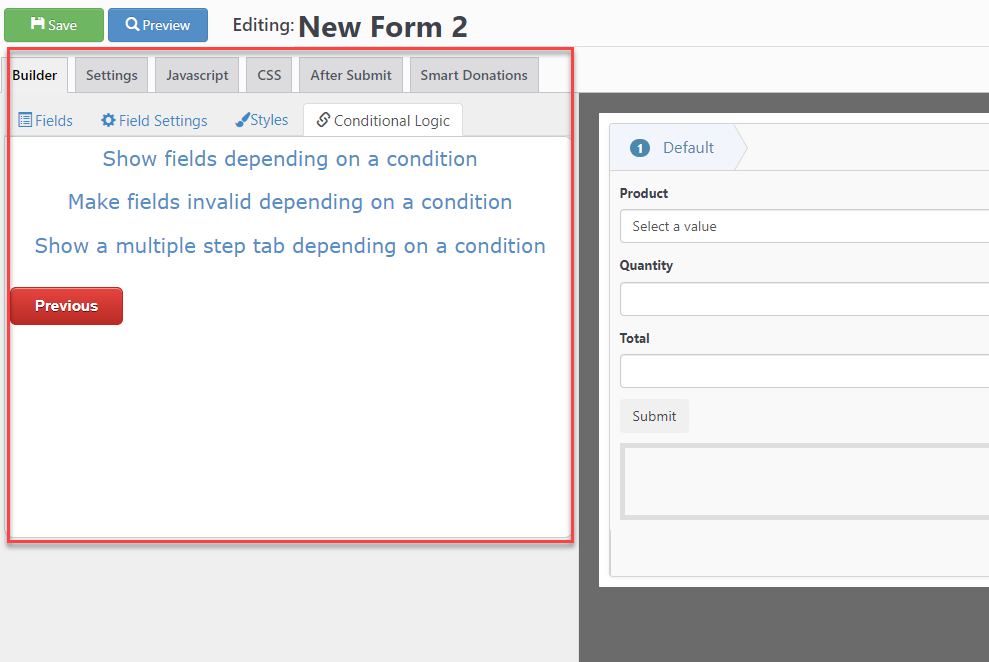
This section also lists all the conditions of your form. So with big forms with many conditions, this list becomes big, and is difficult to find the conditions that belong to a specific field.
So if you want to edit the condition of a particular field or check if a field is part of a condition you could spend a considerable amount of time searching in the condition tab.
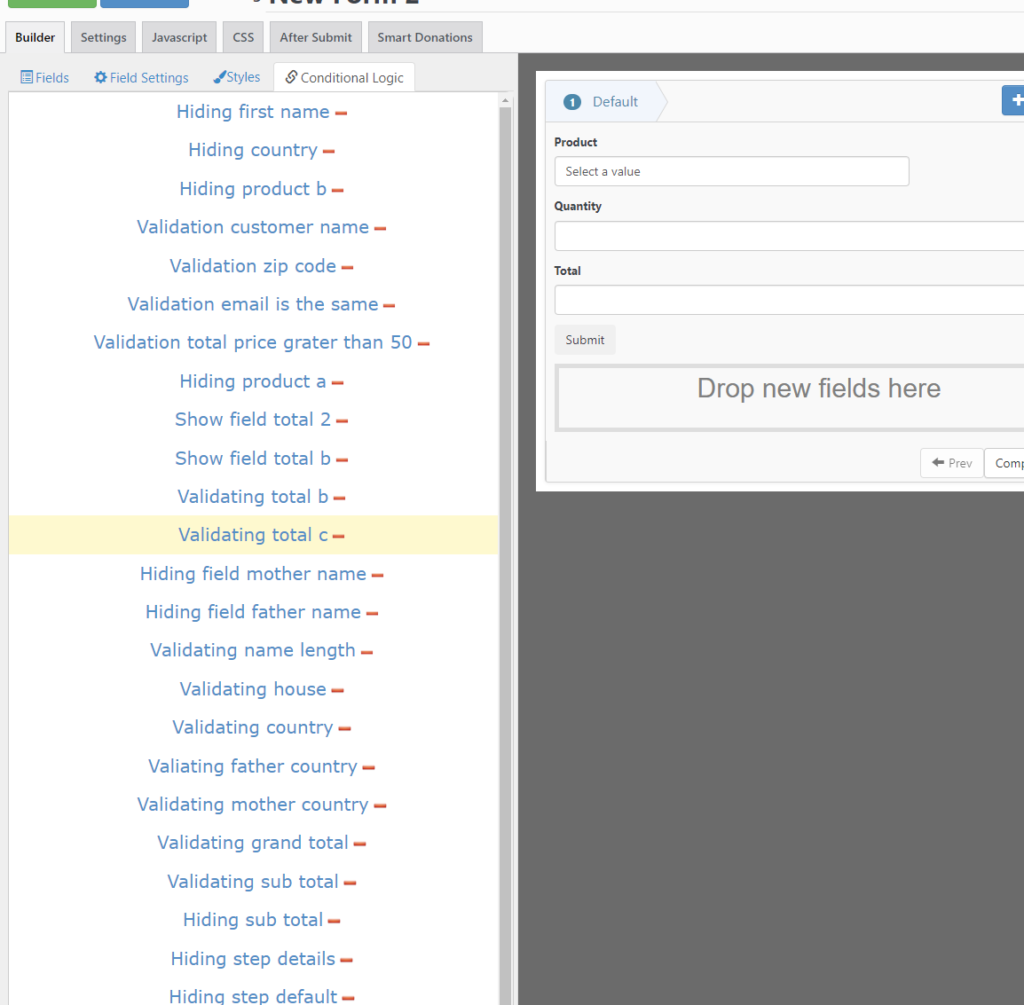
Conditional Logic in AIO Forms
In AIO Forms the conditions work the same way as the field settings, if you want to add or edit a condition you first need to select the field and then go to the condition tab.
In the condition tab, you will see a list of all the available conditions affecting the selected field.
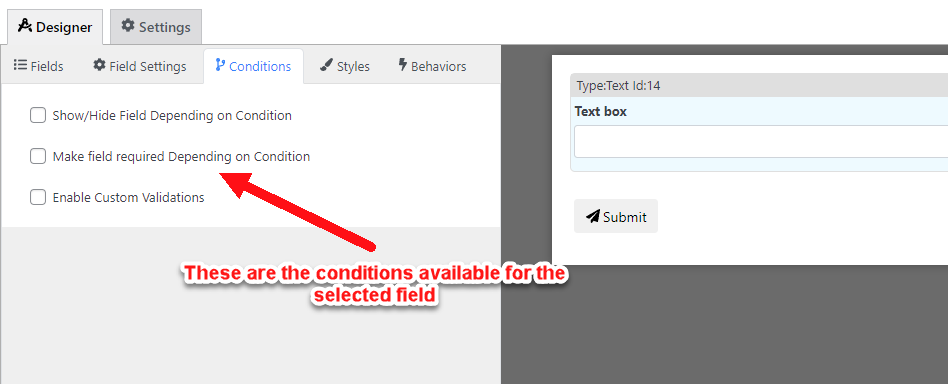
So if you want to edit the conditions of a field or check if you added a condition it is just a matter of selecting the field and going to the condition tab.
There are a lot more conditions in AIO Forms
Making the conditions field-specific (instead of global as in Smart Forms) allowed us to create conditions that are only needed by specific fields, for example, the dropdown field also has conditions to change it’s options or price.
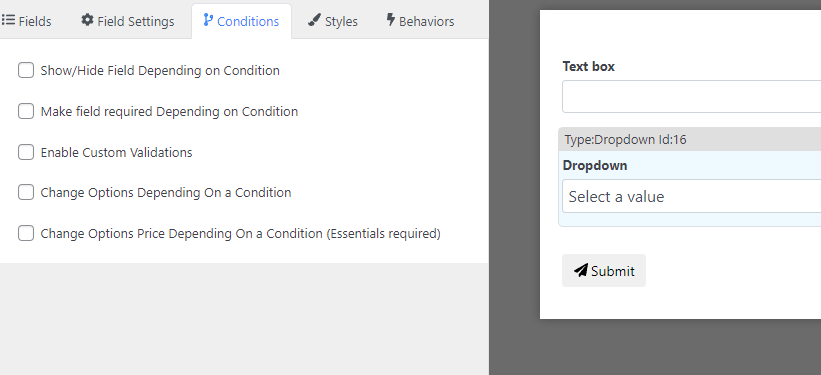
So doing common stuff like changing the options of a dropdown depending on the value of another field becomes very easy
The add ons
We also take this chance to redesign the add-ons making some of them (like the pdf and page builder) A LOT better. To give you an idea, here is an example of how to design a pdf using the pdf add-on of each plugin
AIO forms also have some other neat add-ons like the ChatGPT add-on that let you use AI to empower the form or the emails that are sent. Or the workflow add-on that lets you automate actions when something happens such as a user submitting a form or editing something.
The Fields
AIO also has more fields, some of them very neat like the appointment field which lets your customer pick a date from a list of available slots
Or the product designer field which lets your customers customize a product with their own text and images
If you can see some more examples you can find the demo forms here
Does this mean Smart Forms won’t be maintained anymore?
No, both plugins will continue to be supported and maintained, we believe that AIO Forms is significantly better than smart forms though so if you are just starting a new website we recommend you to use AIO Forms.